 Documentation
Release of 0.7 is in the last stretch, and I would like to give a high leve explanation of how the rendering is handled within Limon now. All hard coded parts of the render pipeline has been removed. Instead, we now have a fully configurable render pipeline, as well as a plugin system for rendering backend, meaning OpenGL can be swapped with OpenGL ES, or Vulkan.
High Level Idea
New render pipeline is fully runtime loaded, and allows changing any and all steps of rendering. This includes model rendering, as well as effect. There are 3 main components working in tandem to achieve this.
Node based Graphical interface
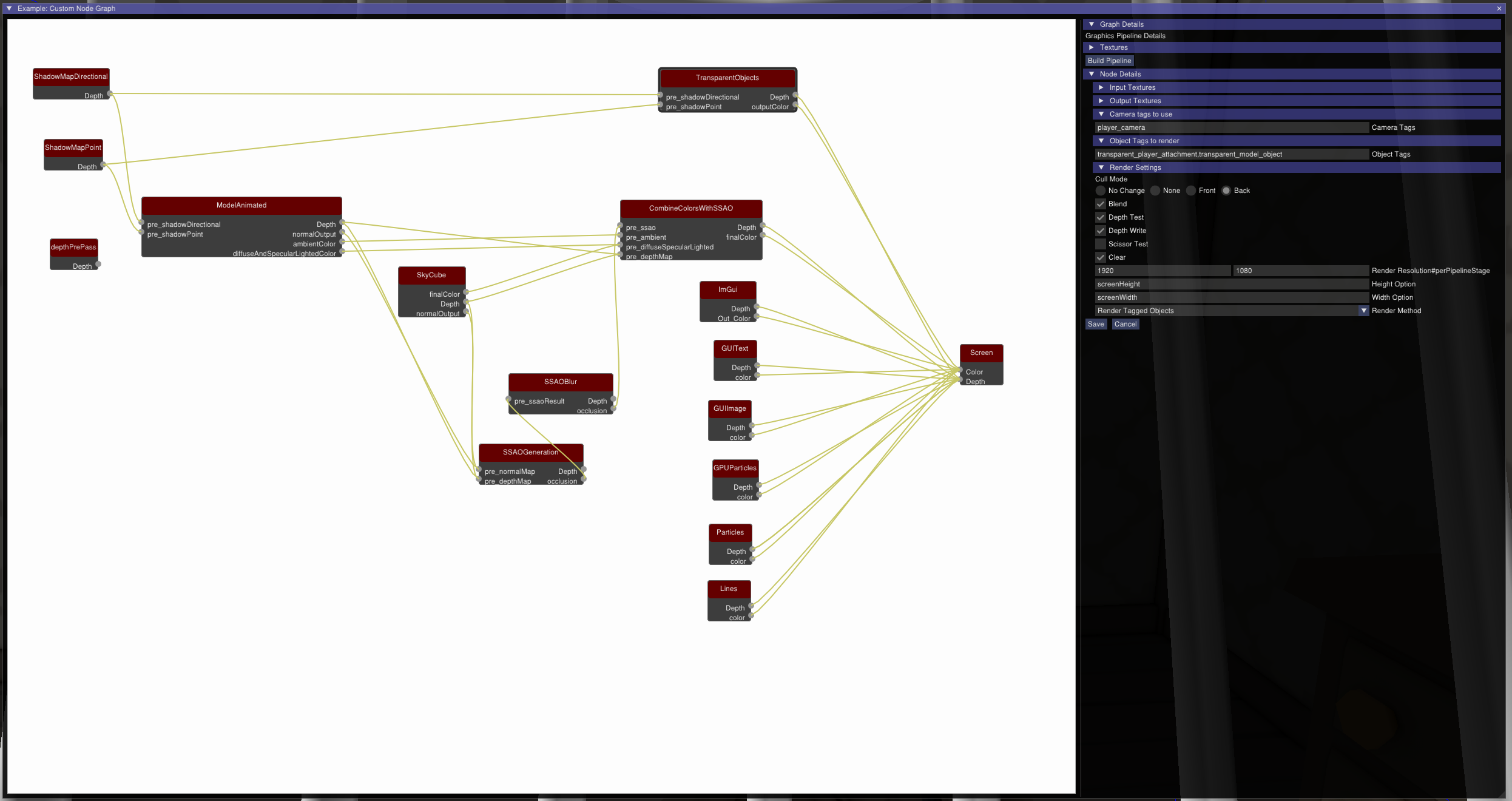
Limon editor now has a node based render pipeline visualization system. It allows you to create textures to use as frame buffers, lists available graphics programs with their inputs and outputs, and each program is represented as a node, so you can connect a programs output to another programs input visually. By choosing the texture to pass data on, different aspects of rendering like resolution can be set. It also uses a tag based system to select which camera to use, or which objects to render in the given pass, to provide most flexibility possible. After the changes, it automatically groups and orders the render passes for maximum performance, within the information it has. It also shows the order it decided, and allows any alterations for it before applying.
Runtime pipeline composition
When the configuration is done, it is converted to a streamlined version that only contains rendering information. Then it is compiled in to an engine object that is run each frame. This version is %100 consistent with the GUI interface, but it is missing information like GUI position of nodes, that is meaningful only in user interactions. This runtime object is responsible for setting up each stage of render pipeline, like attaching GPU programs, attaching frame buffers, setting up alpha blending and depth testing etc.
Render Method implementations
This part is the bulk of actual rendering. We provide render methods for Model game objects, shadow maps, sky, GUI elements etc. Each method implements what happens within the render stage.
Biggest render method is model game object rendering method, called renderCameraByTag. This method finds and activates the camera for the stage, using camera tags. Then renders models that were chosen, this time using object tags. It also manages the material selection and activation. Another important one is the renderQuad method, that renders a full screen quad, for screen space effects.
Limon also expanded the API to allow users to build their own render methods, and SSAO implementation is provided as a sample.
What is the benefit
For a regular user, most of this is not going to be very important, as changing the whole render pipeline is not something you want to undertake lightly. On the other hand, this is a great opportunity for 3 types of users:
- If you want to optimize things, now you can do it without touching engine code.
- If you need rendering capabilities that is not provided out of the box, it is easy to implement, integrate and test, as changes can be viewed in realtime.
- If you want to learn details of rendering, it is easy to isolate a single stage, and experiment on GPU programming.
I managed to switch Limon rendering to a fully deferred pipeline in less than a day using this new system, to check performance difference on IGPUs, and it was a great experience. And since we have a deferred pipeline ready, new version of Limon will be shipping with both forward and deferred pipelines out of the box.